Tutorial · Instagram · comment to DM
keyhook. · the open-source ManyChat alternative for Instagram
Build your own comment to DM without paying for ManyChat. Whoever comments your keyword gets your link by direct message. It runs for free on Vercel and Supabase, and the whole step by step is right here.
Checked in November 2026, with new Meta apps
I want the GUIDE
your.account
Here is the guide you asked for!
Get the guide
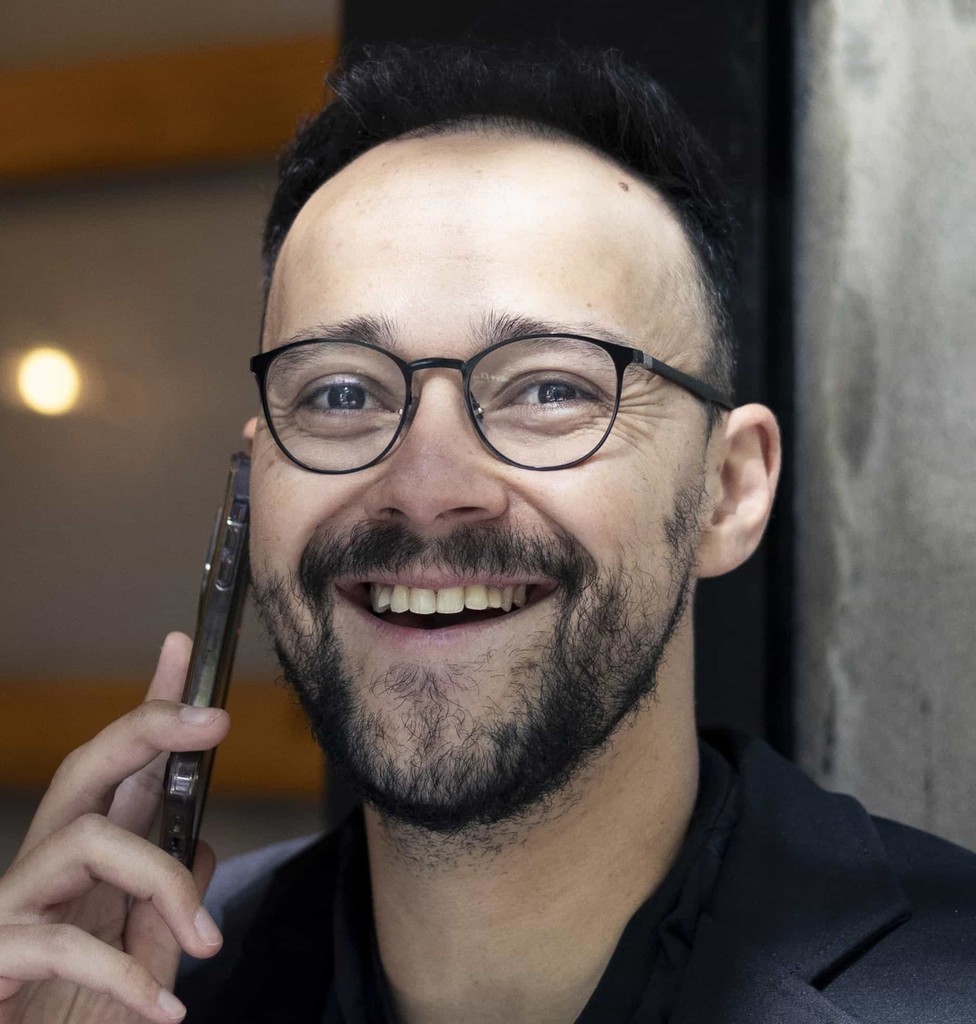
Who made it
A designer who loves code.
Hi, I am Álvaro, a product designer. I wanted to stop paying for a tool just to send a link by DM. Halfway through, Meta changed how new apps log in and the tutorials stopped working. I found the new path, tested it with real comments and opened the code. I built it all with Claude Code.
- 1PrepareYour copy, Supabase and the Meta app
- 2PublishVercel and Meta settings
- 3UseConnect and test
Step 0 of 6
Before you start gather what is yours.
Everything is free and you write no code. About an hour, with four sites open: Supabase, Meta, Vercel and the Instagram app.
Get your copy of the project
On the Keyhook repository, click Use this template, then Create a new repository. Give it a name, keep it Private if you like, and create it. Done: the code is now yours, in your GitHub.
No download needed. Vercel deploys straight from your GitHub.
What you need
- A professional Instagram account, Creator or Business
- A business portfolio on Meta with your Instagram in it
- Free accounts on GitHub, Vercel and Supabase
- A second Instagram account to test with
What it costs
$0 per month. The free plans of Vercel and Supabase are more than enough for a creator's volume.
What it does and does not do yet
A keyword comment becomes a DM with a button, on one post or all of them, with click tracking and a dashboard.
Not yet: checking if the person follows you and sending reminders. For new Meta apps that requires App Review and business verification.
If you want, ask Claude Code for help
The project ships with instructions for Claude Code. Paste this and follow along:
I want to set up Keyhook (github.com/alvarosouza01/keyhook) for my Instagram account. Read the repository's README.md and docs/setup.md and guide me step by step, one screen at a time, waiting for me to confirm before moving on. Never ask me for keys, tokens or passwords in chat: I paste them straight into Vercel.Step 1 of 6
Supabase, the database.
This is where automations and deliveries are stored.
Create the project
At supabase.com, create a project on the Free plan in the region closest to you. Keep the database password in your password manager: Keyhook does not need it.
Run the SQL
Open the schema.sql file, copy everything, paste it in the SQL Editor and click Run. You should see "Success".
Save two values
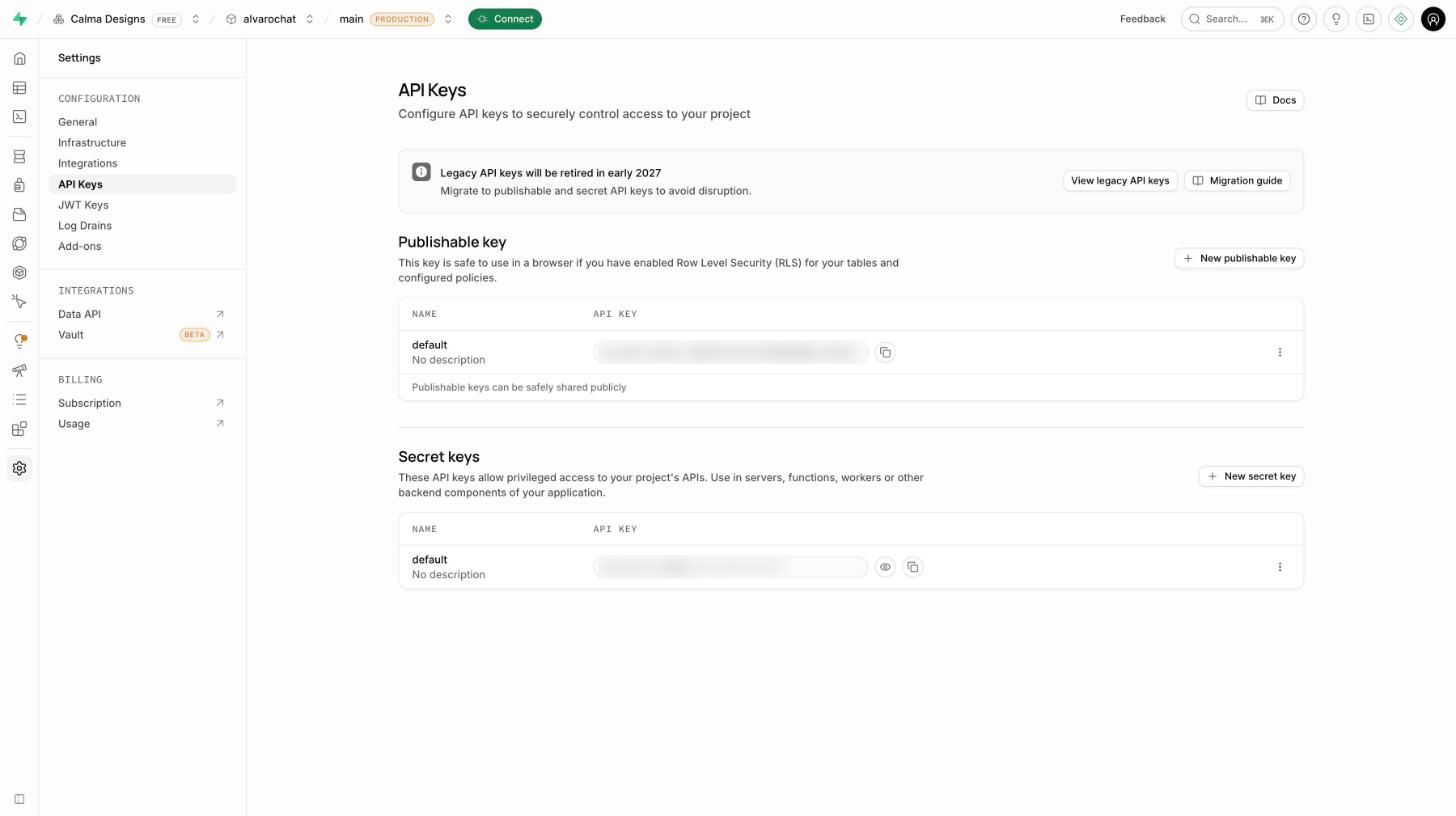
- Project Settings, Data API: the project URL, without /rest/v1/
- Project Settings, API Keys: the secret key that starts with sb_secret_
Careful: do not use the publishable key.
Step 2 of 6
The app on Meta.
The most tedious part, and the most important. Follow the order.
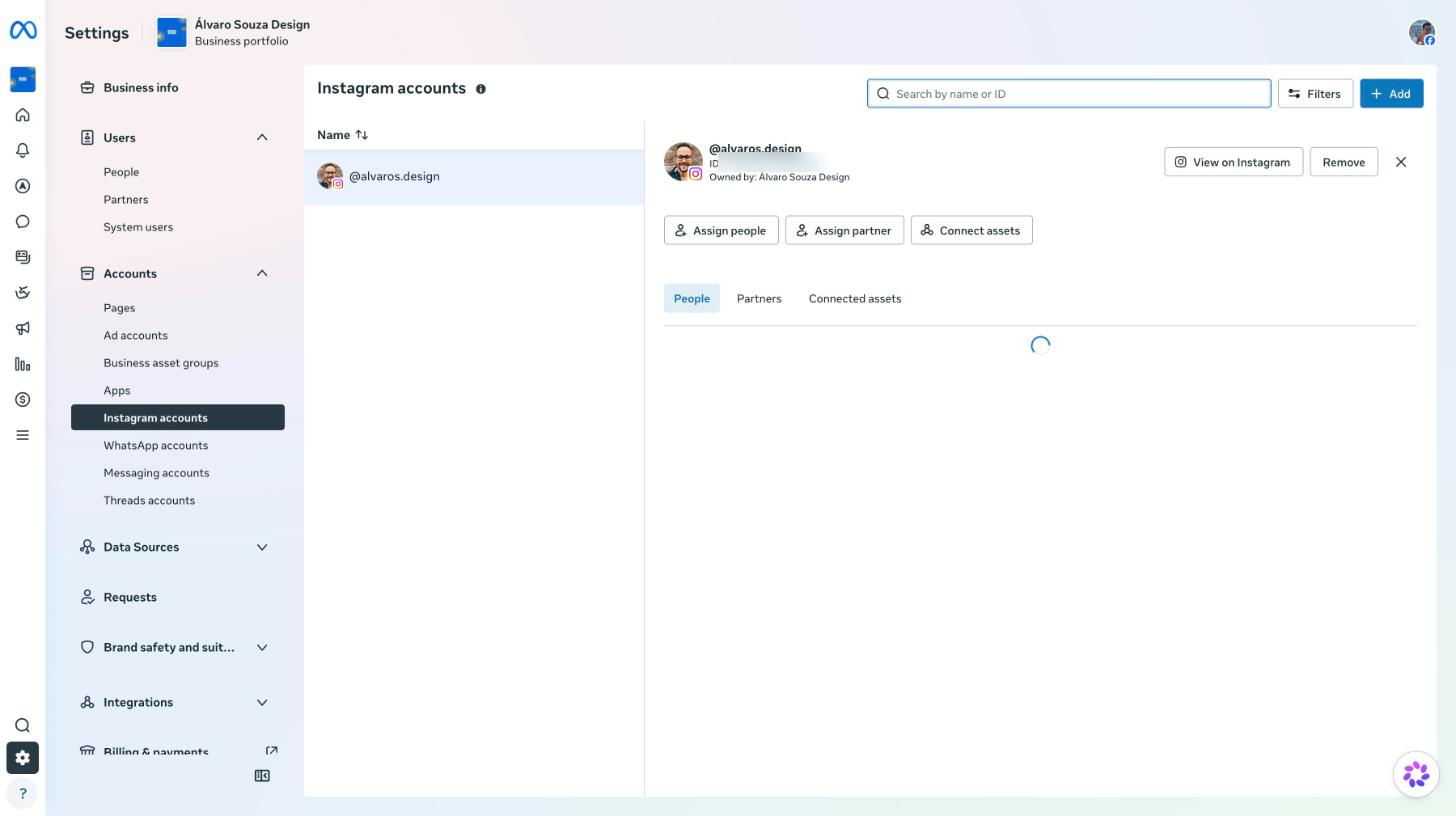
Instagram in your portfolio
At business.facebook.com/settings, go to Accounts, Instagram accounts. If it shows Login needed, click it and log in to Instagram.
Create the app
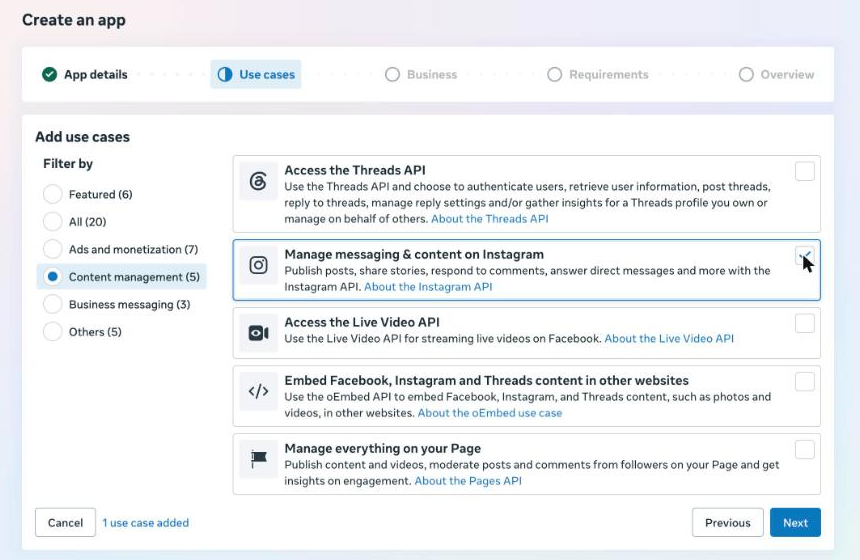
- At developers.facebook.com/apps, click Create App
- Use cases: filter by Content management and check only Manage messaging & content on Instagram
- Business: pick your portfolio and create the app
Expected: Meta says Instagram login is not available for newer apps. Keyhook uses Unified login.
Add three permissions
In Use cases, Customize, Permissions and features, click Add on these three. Not the ones starting with instagram_business_.
instagram_basic, instagram_manage_comments, instagram_manage_messages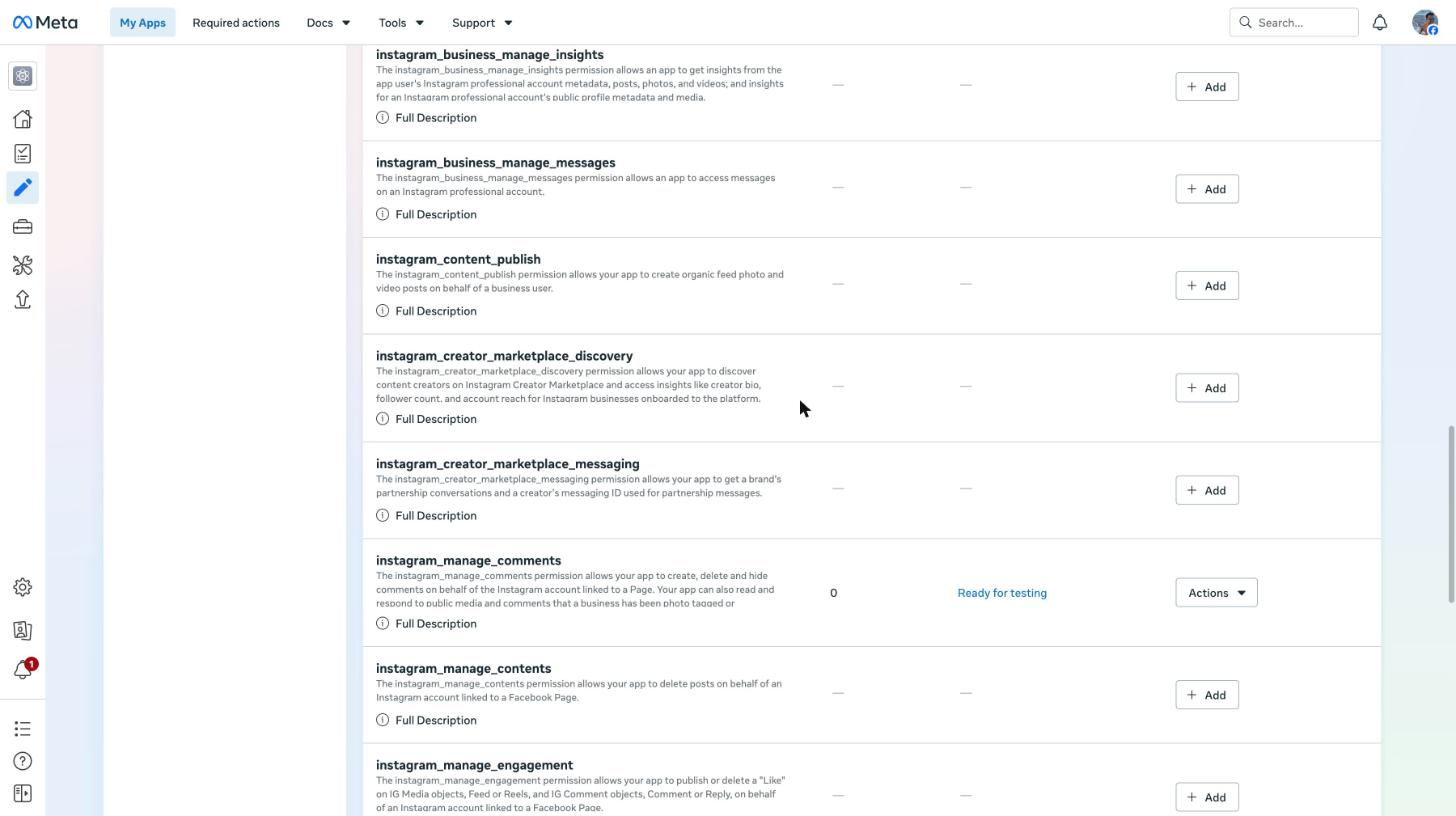
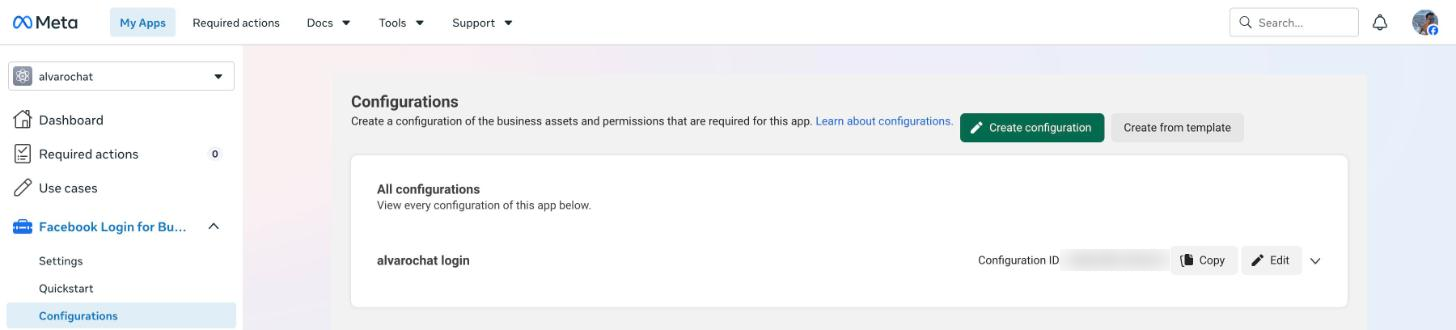
Create the login configuration
- Facebook Login for Business, Configurations, Create configuration
- Variation General, token System-user, expiration Never
- Assets: only Instagram accounts, marked as required
- Permissions: the three above. Save the Configuration ID
Save the app ID and secret
In App settings, Basic: the App ID and, after clicking Show, the App secret.
Step 3 of 6
Live, on Vercel.
Vercel takes your copy from GitHub and puts it live.
Make up two values
- A long random string for the webhook
- A password for your dashboard
Import your project
On Vercel, click Add New, Project and import your Keyhook copy. Before clicking Deploy, open Environment Variables and paste the variables below with your values. For APP_URL, use https://example.com for now.
META_APP_ID=
META_APP_SECRET=
META_LOGIN_CONFIG_ID=
WEBHOOK_VERIFY_TOKEN=
APP_URL=https://example.com
ADMIN_PASSWORD=
SUPABASE_URL=
SUPABASE_SECRET_KEY=
OWNER_NAME=
CONTACT_EMAIL=Tip: Vercel splits everything on its own when you paste the whole list in the first field.
Fix the address
Copy the address Vercel gives you, set it as APP_URL in Settings, Environment Variables, and Redeploy.
Tip: variable changes only apply after a new deploy.
Step 4 of 6
Connect to Meta.
Replace YOUR_ADDRESS with your Vercel address.
Redirect URL
Facebook Login for Business, Settings, Valid OAuth Redirect URIs:
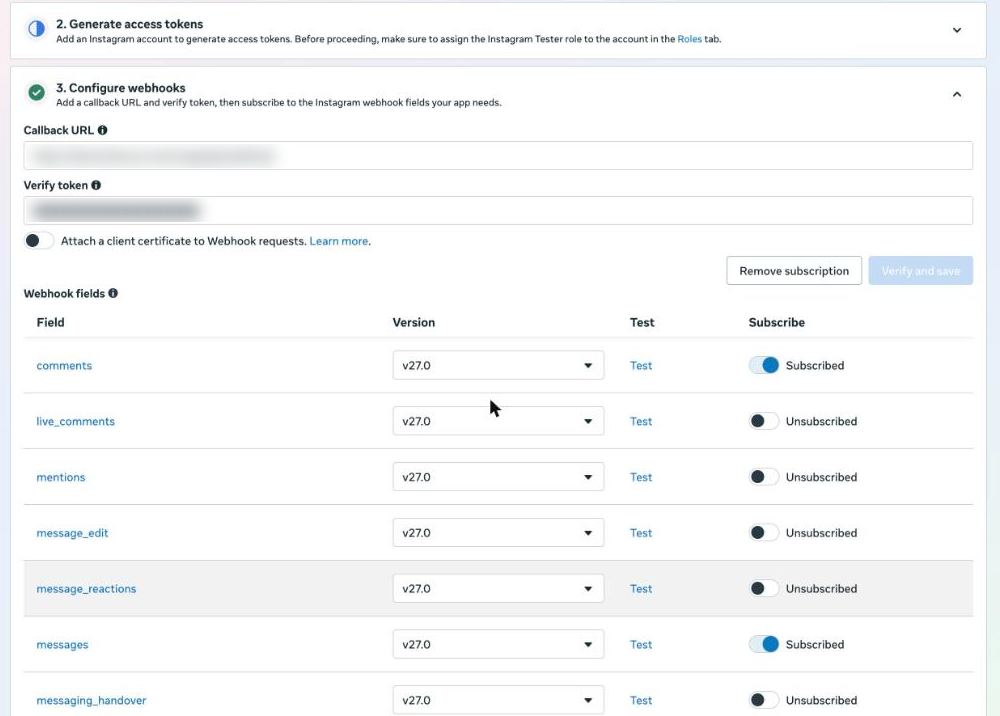
YOUR_ADDRESS/api/connect/callbackWebhook
Use cases, Customize, API setup with Unified login, step 3. Paste the address and your webhook string, click Verify and save and subscribe to comments.
YOUR_ADDRESS/api/webhookDo not use "API setup with Facebook login": it is the legacy setup and needs a Page.
Required pages
App settings, Basic. Category: Messenger bots for business.
YOUR_ADDRESS/privacyYOUR_ADDRESS/data-deletionPublish the app
In the menu, Publish. Without it Meta does not send comments.
Step 5 of 6
Connect your Instagram.
Two clicks in your dashboard.
Open the dashboard
YOUR_ADDRESS/adminSign in, click Connect Instagram, choose the account and approve.
Check
Your @ shows in the corner of the dashboard. In /admin/events, subscribed_apps shows success.
Step 6 of 6
Test it for real.
From a second account, like a follower would.
Create the automation
In New automation: name, keyword, message, button and link. Pick a post or leave it on all.
Comment
With the second account, comment the keyword on the post. The DM arrives in seconds, often under Message requests.
Important: comments from your own account are ignored on purpose.
Tap the button
The dashboard shows 1 DM and 100% clicked. Done.
If you get stuck
The error usually has a name.
Open YOUR_ADDRESS/admin/events: it shows everything Meta sent and what Keyhook did.
| What happens | What it is |
|---|---|
| Nothing arrives when I comment | App not published, comments field not subscribed, or the account is not connected in the dashboard. |
| The event arrives but no DM goes out | The automation is paused, the keyword differs, or the comment came from your own account. |
| Could not find the table | The SQL from step 1 was not run in that Supabase project. |
| I changed a variable and nothing happened | Redeploy on Vercel. |
| The configuration's permission list is empty | Add the three permissions to the use case before creating the configuration. |
| Only API setup with Unified login shows | That is normal for new apps. Keep going. |
Common questions.
Is it really free?
Yes. The code is open source and runs on the free plans of Vercel and Supabase.
Do I need a Facebook Page?
No. You need a business portfolio on Meta with your Instagram in it.
Can I run it next to ManyChat?
Yes, as long as they do not answer the same keyword on the same post. Instagram allows one automatic reply per comment.
Can my account get blocked?
Keyhook only uses Meta's official API. Only reply to people who asked for something: unsolicited mass messages break Instagram's rules.
Who gives support?
It is an open project, provided as is. Questions go to GitHub Issues, where the answer helps everyone.